API Reference
Overview & Integration Architecture
Talent Kasi is an AI-powered recruitment technology platform designed to transform how organizations discover, evaluate, and hire talent. It provides employers with an end-to-end digital hiring ecosystem for publishing vacancies, receiving and managing applications, AI-powered CV screening and candidate analysis, shortlisting applicants, collaborating with recruitment teams, and making faster, data-driven hiring decisions. Through its developer APIs, integrations, company career pages, analytics, and scalable subscription plans, Talent Kasi enables businesses of all sizes to automate recruitment processes while building more efficient and intelligent talent pipelines.
The Talent-Kasi REST API is a hiring integration API. HR software platforms, custom career portals, and ATS tools can post jobs, submit candidate applications with CV uploads, run and read AI match scores, and receive signed webhooks — without using the HR dashboard. Company settings, team, billing, and API-key management stay on JWT dashboard endpoints; you only need those once, to mint a key.
Integration Flow Architecture
HTTPS · HMAC-SHA256/api/v1/jobs
Post job posting with custom AI scoring priority weights.
/jobs/:id/applications
Upload candidate CV PDF/DOCX via multipart file form.
/jobs/:id/screening-results
AI automatically parses CV and calculates 0-100 match scores.
Your Webhook URL
Receive real-time signed POST events (X-TalentKasi-Signature).
Credentials & Storage Guidance
Store API keys and webhook secrets in server environment variables — never in frontend client code. A JWT from register or login is only for minting keys; hiring calls use the API key.
| Credential | Format Prefix | Direction | Purpose |
|---|---|---|---|
| API Key | tk_live_... / tk_test_... | Client → TalentKasi | Authenticates requests on header X-API-Key or Authorization: Bearer |
| API Scopes | jobs:read, jobs:write, applications:read, applications:write, screening:write, webhooks:manage | Role Guard | Permissions attached to the API key restricting resource access |
| Webhook Secret | whsec_... | TalentKasi → Client | Shared HMAC-SHA256 secret to verify X-TalentKasi-Signature headers on inbound webhooks |
Authentication & Key Scopes
Public hiring endpoints authenticate with an API key, not a user session. Pass the secret in either header format on every request. A request lacking a required scope returns 403 Forbidden. JWT tokens from register or login are only used to mint (or manage) keys.
🔑 API-only: mint a test key without the dashboard
- Register:
POST /auth/registercreates a company on the Free plan and returnsaccess_token/refresh_token. - Create a test key:
POST /company/api-keyswith that JWT and{ "environment": "test", "scopes": [...] }. Test keys (tk_test_) work on Free. Livetk_live_keys still require a Growth or Enterprise plan. - Call the hiring API: send
X-API-Key: tk_test_...on jobs, applications, screening, and webhooks. The JWT is not needed after the secret is stored.
curl -X POST "https://api.talentkasi.com/api/v1/auth/register" \
  -H "Content-Type: application/json" \
  -d '{
    "email": "[email protected]",
    "password": "Password123!",
    "first_name": "Ada",
    "last_name": "Okello",
    "company_name": "Acme Hiring"
}'curl -X POST "https://api.talentkasi.com/api/v1/company/api-keys" \
-H "Authorization: Bearer ACCESS_TOKEN" \
-H "Content-Type: application/json" \
-d '{
"name": "ATS integration",
"environment": "test",
"scopes": [
"jobs:read", "jobs:write",
"applications:read", "applications:write",
"screening:write", "webhooks:manage"
]
}'Or generate a key in the HR dashboard
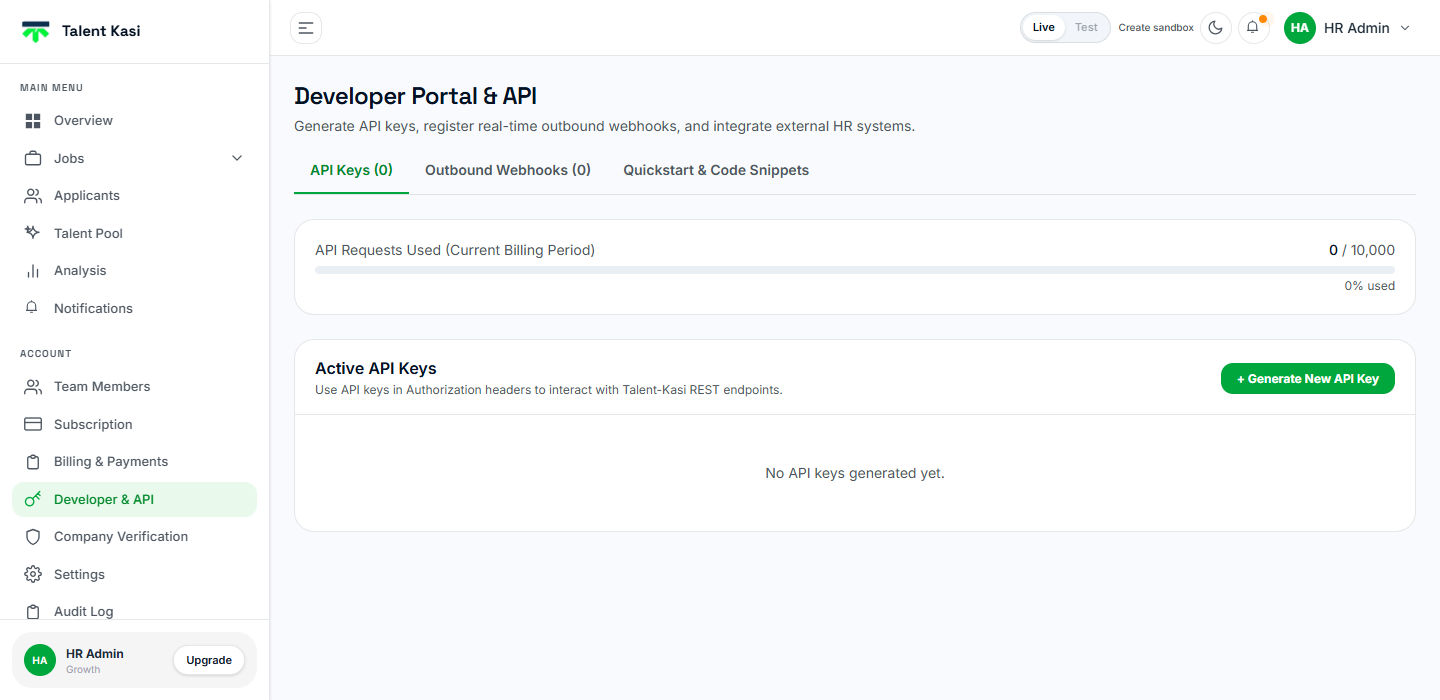
- Sign in to Talent Kasi. Test keys work on Free; live keys require Growth or Enterprise.
- Open Developer & API and click + Generate New API Key. Production
tk_live_writes your live company; Testtk_test_writes an isolated sandbox company. - Copy the secret once and store it in server environment variables. A test key also creates (or reuses) a sandbox dashboard — copy those login credentials if they are shown.
X-API-Key: tk_live_9f8e7d6c5b4a3f2e1d0c
Authorization: Bearer tk_live_9f8e7d6c5b4a3f2e1d0c
curl -X GET "https://api.talentkasi.com/api/v1/jobs" \
  -H "X-API-Key: tk_live_9f8e7d6c5b4a3f2e1d0c"
Scopes: jobs:read, jobs:write, applications:read, applications:write, screening:write, webhooks:manage. Grant only what the integration needs.
Rate Limits & Rate Limit Headers
Two separate limits apply. Every caller gets a fixed 100 requests per minute burst limit, and on top of that your company has a monthly request quota set by your subscription plan (visible in your dashboard under Account → Billing & Plans). Every response carries the per-minute counters plus X-API-Version: 1.0:
| Header | Description |
|---|---|
| X-RateLimit-Limit | Requests permitted in the current one-minute window (100). |
| X-RateLimit-Remaining | Remaining request allowance in the current window. |
| X-RateLimit-Reset | Seconds remaining until the current window resets — a duration, not a Unix timestamp. |
Exceeding Limits or Inactive Plan Access
Bursting past 100 requests per minute or exhausting your monthly quota returns 429 Too Many Requests. A tk_live_ key on a plan without API access (Free) returns 403 Forbidden. tk_test_ keys work on Free, skip the monthly quota, and still share the 100 req/min burst limit and the same scopes. Check quota usage in Developer & API when you use the dashboard.
Errors & Status Codes
Errors follow RFC 7807 and are served with Content-Type: application/problem+json. Validation failures add an errors array alongside the summary in detail:
{
  "type": "https://api.talentkasi.com/errors/unauthorized",
  "title": "Unauthorized",
  "statusCode": 401,
  "status": 401,
  "detail": "Missing API key. Pass X-API-Key or Authorization: Bearer tk_live_...",
  "instance": "/api/v1/jobs",
  "timestamp": "2026-08-07T10:15:00.000Z",
  "path": "/api/v1/jobs"
}| Status Code | Description & Guidance |
|---|---|
| 400 Bad Request | Validation error — inspect the detail field for exact field-level validation failures (e.g. missing title). |
| 401 Unauthorized | Missing, malformed, disabled, deleted, or expired API key. |
| 403 Forbidden | Live key on a plan without API access (Free), or the key lacks the required scope. Test keys (tk_test_) are allowed on Free. |
| 404 Not Found | Target job or application ID does not exist or belongs to a different company account. |
| 409 Conflict | This email has already applied to this job — one application per email address per job is allowed. |
| 429 Too Many Requests | More than 100 requests in a minute, or your monthly company quota is exhausted. Back off and retry, or upgrade your plan. |
Jobs API & Weighted AI Scoring
Create and manage job postings programmatically. Requires jobs:read or jobs:write.
List your company's jobs. Filter with ?status=open|closed|archived and page with ?page and ?page_size (default 20, max 100).
Get full detail for a single job including posting fields, custom details, and scoring priorities.
Create a new job. Title is required. Other posting fields are optional — send only what this job needs, plus posting_fields (ordered keys) and custom_posting_fields for extra labeled details. Careers listing is company-wide (PATCH /companies/settings with careers_visible), not per job.
Upload a job image (PNG, JPEG, or WebP, max 2MB). Returns a public URL to attach on create or update.
Delete an uploaded job image that is no longer needed. Body: { url }.
Update job fields. Careers listing is company-wide: PATCH /companies/settings with careers_visible.
Close a job to new applications. Every applicant not yet shortlisted or rejected is auto-rejected and emailed.
Archive (soft-delete) a job posting. Its uploaded images are permanently deleted. Returns an empty 200 body.
Careers listing is company-wide. Hide or show every open role from the careers page with PATCH /companies/settings (company admin JWT — not an API-key scope).
Dashboard JWT only (not API keys). Set careers_visible to false to hide every open role from the company careers page and public job board. Jobs stay open for dashboard and POST /jobs/:id/applications.
Public company profile, including careers_visible. Use this to know whether the careers page lists roles.
AI Scoring Weights & Custom Dimensions
When creating or updating a job, customize how the AI screener evaluates candidates by passing weights (0-100) per dimension in scoring_priority:
- skills, experience, education, domain, responsibilities
- certifications, projects, languages, location
Add up to 5 role-specific criteria in custom_scoring_dimensions (e.g. Culture Fit, Leadership) or disable unneeded fixed criteria in disabled_scoring_dimensions.
1. List Jobs (GET /jobs)
curl -X GET "https://api.talentkasi.com/api/v1/jobs?status=open" \
  -H "X-API-Key: tk_live_9f8e7d6c5b4a3f2e1d0c"
Response Payload (JSON):
{
  "count": 14,
  "page": 1,
  "page_size": 20,
  "results": [
    {
      "id": "3f8b1c92-4a7e-4d21-9c53-8e2f6a1b0d47",
      "title": "Senior Full-Stack Engineer",
      "location": "Nairobi, Kenya (Hybrid)",
      "employment_type": "full_time",
      "status": "open",
      "created_at": "2026-08-07T10:00:00.000Z"
    }
  ]
}
2. Get Job Detail (GET /jobs/:id)
curl -X GET "https://api.talentkasi.com/api/v1/jobs/3f8b1c92-4a7e-4d21-9c53-8e2f6a1b0d47" \
  -H "X-API-Key: tk_live_9f8e7d6c5b4a3f2e1d0c"
3. Create Job (POST /jobs)
curl -X POST "https://api.talentkasi.com/api/v1/jobs" \
  -H "X-API-Key: tk_live_9f8e7d6c5b4a3f2e1d0c" \
  -H "Content-Type: application/json" \
  -d '{
    "title": "Senior Full-Stack Engineer",
    "location": "Nairobi, Kenya (Hybrid)",
    "employment_type": "full_time",
    "description": "We are seeking an experienced Node.js and React engineer...",
    "requirements": "Bachelor degree in CS, 5+ years TypeScript & Node.js experience",
    "scoring_priority": {
      "skills": 40,
      "experience": 30,
      "education": 15,
      "domain": 15
    },
    "custom_scoring_dimensions": [
      {
        "key": "culture_fit",
        "label": "Culture Fit",
        "description": "Cross-functional teamwork and comfort with ambiguity",
        "weight": 20
      }
    ]
  }'
Careers listing is company-wide. Hide every open role from the public careers page with JWT PATCH /companies/settings { "careers_visible": false }. Jobs stay open for dashboard and API apply.
4. Update Job (PATCH /jobs/:id)
curl -X PATCH "https://api.talentkasi.com/api/v1/jobs/3f8b1c92-4a7e-4d21-9c53-8e2f6a1b0d47" \
  -H "X-API-Key: tk_live_9f8e7d6c5b4a3f2e1d0c" \
  -H "Content-Type: application/json" \
  -d '{ "title": "Lead Full-Stack Engineer", "salary_range": "$90,000 - $110,000" }'
Closing a job stops applications. To hide the careers page, use PATCH /companies/settings { "careers_visible": false } — not a per-job field.
5. Hide jobs from the careers page (PATCH /companies/settings)
curl -X PATCH "https://api.talentkasi.com/api/v1/companies/settings" \
  -H "Authorization: Bearer ACCESS_TOKEN" \
  -H "Content-Type: application/json" \
  -d '{ "careers_visible": false }'
Requires a company-admin dashboard JWT, not an API key. { "careers_visible": false } hides every open role from the careers page and public job board. Jobs stay open for POST /jobs/:id/applications and the HR dashboard. Set true to list them again.
Response Payload (JSON):
{
  "id": "a1b2c3d4-5678-90ab-cdef-1234567890ab",
  "slug": "acme-hiring",
  "name": "Acme Hiring",
  "careers_visible": false,
  "status": "active"
}
6. Close Job (POST /jobs/:id/close)
curl -X POST "https://api.talentkasi.com/api/v1/jobs/3f8b1c92-4a7e-4d21-9c53-8e2f6a1b0d47/close" \
  -H "X-API-Key: tk_live_9f8e7d6c5b4a3f2e1d0c"
Response Payload (JSON):
{
  "job": {
    "id": "3f8b1c92-4a7e-4d21-9c53-8e2f6a1b0d47",
    "status": "closed",
    "updated_at": "2026-08-07T16:00:00.000Z"
  },
  "auto_rejected": 4
}
auto_rejected counts the applicants that were still undecided (anything other than shortlisted or rejected). Each one is set to rejected and sent a rejection email, so only close a job once you are done with its pipeline.
7. Archive Job (DELETE /jobs/:id)
curl -X DELETE "https://api.talentkasi.com/api/v1/jobs/3f8b1c92-4a7e-4d21-9c53-8e2f6a1b0d47" \
  -H "X-API-Key: tk_live_9f8e7d6c5b4a3f2e1d0c"
Returns 200 OK with an empty body. The job moves to archived.
Applications & Candidate CV Ingestion
Submit candidates and review applicants, including CV uploads that automatically trigger AI screening. Reading requires applications:read; submitting and status changes require applications:write.
Submission is multipart/form-data and first_name, last_name, email, phone and cv are all required — omitting any of them returns 400. The CV must be a PDF or DOCX. Any extra questions you configured on the job's application form go in optional_fields as a JSON object. Apply still works when the company has hidden jobs from its careers page (careers_visible: false).
Submit a candidate application with a CV file. Triggers AI screening automatically. Works even when the company has hidden jobs from its careers page.
List applicants for a job. Supports ?page, ?page_size, and ?status.
Get applicant detail: the full screening result (including extracted referees) and a pre-signed CV download URL.
Set an applicant's status to shortlisted or rejected. This emails the candidate.
1. Submit Candidate CV (POST /jobs/:jobId/applications)
curl -X POST "https://api.talentkasi.com/api/v1/jobs/3f8b1c92-4a7e-4d21-9c53-8e2f6a1b0d47/applications" \
  -H "X-API-Key: tk_live_9f8e7d6c5b4a3f2e1d0c" \
  -F "first_name=Amina" \
  -F "last_name=Ochieng" \
  -F "[email protected]" \
  -F "phone=+254712345678" \
  -F "cv=@/path/to/resume.pdf"
Response Payload (JSON):
{
  "id": "b7d4e2f1-9c8a-4e35-b012-5f7a3c9d1e64",
  "job_id": "3f8b1c92-4a7e-4d21-9c53-8e2f6a1b0d47",
  "first_name": "Amina",
  "last_name": "Ochieng",
  "email": "[email protected]",
  "phone": "+254712345678",
  "status": "received",
  "created_at": "2026-08-07T12:00:00.000Z"
}
2. List Job Applicants (GET /jobs/:jobId/applications)
curl -X GET "https://api.talentkasi.com/api/v1/jobs/3f8b1c92-4a7e-4d21-9c53-8e2f6a1b0d47/applications?page=1&page_size=20" \
  -H "X-API-Key: tk_live_9f8e7d6c5b4a3f2e1d0c"
Response Payload (JSON):
{
  "count": 1,
  "page": 1,
  "page_size": 20,
  "results": [
    {
      "id": "b7d4e2f1-9c8a-4e35-b012-5f7a3c9d1e64",
      "job_id": "3f8b1c92-4a7e-4d21-9c53-8e2f6a1b0d47",
      "first_name": "Amina",
      "last_name": "Ochieng",
      "email": "[email protected]",
      "status": "screened",
      "created_at": "2026-08-07T12:00:00.000Z"
    }
  ]
}
3. Get Applicant Detail & CV URL (GET /applications/:id)
curl -X GET "https://api.talentkasi.com/api/v1/applications/b7d4e2f1-9c8a-4e35-b012-5f7a3c9d1e64" \
  -H "X-API-Key: tk_live_9f8e7d6c5b4a3f2e1d0c"
Response Payload (JSON):
{
  "id": "b7d4e2f1-9c8a-4e35-b012-5f7a3c9d1e64",
  "job_id": "3f8b1c92-4a7e-4d21-9c53-8e2f6a1b0d47",
  "first_name": "Amina",
  "last_name": "Ochieng",
  "email": "[email protected]",
  "status": "shortlisted",
  "cv_download_url": "https://s3.talentkasi.com/resumes/amina_cv.pdf?X-Amz-Expires=3600...",
  "screening_result": {
    "match_score": 88,
    "justification": "Six years of TypeScript and Node.js with strong system architecture background.",
    "strengths": ["6+ years Node.js & React", "TypeScript expert"],
    "gaps": ["No direct AWS DevOps certification"],
    "dimension_scores": {
      "skills": { "score": 95, "evidence": "Shipped three production React/Node platforms" }
    },
    "referees": [
      { "name": "J. Mwangi", "role": "Engineering Manager", "contact": "+254700000000" }
    ]
  }
}
The CV URL is pre-signed and expires in one hour — fetch it fresh each time rather than storing it. Note that recommendation is not stored on the application; it is derived from match_score and only appears on the screening-results endpoint below.
4. Update Hiring Status (PATCH /applications/:id)
curl -X PATCH "https://api.talentkasi.com/api/v1/applications/b7d4e2f1-9c8a-4e35-b012-5f7a3c9d1e64" \
  -H "X-API-Key: tk_live_9f8e7d6c5b4a3f2e1d0c" \
  -H "Content-Type: application/json" \
-d '{ "status": "shortlisted" }'Candidate Hiring Status Lifecycle
These six values are the complete set that PATCH /applications/:id accepts — anything else returns 400. Most are managed by the screening pipeline; in practice you only ever set shortlisted or rejected yourself, and doing so emails the candidate. No status is terminal, so a decision can be reversed.
| Status | Meaning | Set By |
|---|---|---|
| received | Application accepted and queued for AI screening. | Platform |
| screened | Screening finished — match score, dimension breakdown, strengths and gaps are available. | Platform |
| screening_failed | The CV could not be parsed or the AI call failed. No score; review the candidate manually. | Platform |
| pending_quota | Screening deferred because the company's monthly screening quota is exhausted. Runs once the quota resets or the plan is upgraded. | Platform |
| shortlisted | Moved forward in your pipeline. Emails the candidate. | You |
| rejected | Declined. Emails the candidate. Also applied automatically to every undecided applicant when a job is closed. | You |
AI Screening Results
Fetch AI match scores, fit recommendations (STRONG_FIT at 75 and above, MODERATE_FIT at 50-74, WEAK_FIT below 50), dimension breakdown, strengths and gaps for every applicant on a job. Queue or re-run screening with screening:write. Referees extracted from a CV are returned by GET /applications/:id rather than here. Reading results requires applications:read.
Get AI match scores, fit recommendations, justifications, strengths and gaps for every applicant on a job. Paged with ?page and ?page_size.
Queue AI screening for every applicant on this job. Returns 202 when queued.
Run or re-run AI screening for a single applicant.
curl -X GET "https://api.talentkasi.com/api/v1/jobs/3f8b1c92-4a7e-4d21-9c53-8e2f6a1b0d47/screening-results" \
-H "X-API-Key: tk_live_9f8e7d6c5b4a3f2e1d0c"curl -X POST "https://api.talentkasi.com/api/v1/jobs/3f8b1c92-4a7e-4d21-9c53-8e2f6a1b0d47/screening/run" \
-H "X-API-Key: tk_live_9f8e7d6c5b4a3f2e1d0c"Example Screening Response Payload (JSON)
{
  "is_sandbox": false,
  "count": 1,
  "page": 1,
  "page_size": 20,
  "results": [
    {
      "applicant_id": "b7d4e2f1-9c8a-4e35-b012-5f7a3c9d1e64",
      "first_name": "Amina",
      "last_name": "Ochieng",
      "email": "[email protected]",
      "status": "screened",
      "applied_at": "2026-08-07T12:00:00.000Z",
      "screening": {
        "match_score": 88,
        "recommendation": "STRONG_FIT",
        "justification": "Six years of TypeScript and Node.js with a strong system architecture background.",
        "strengths": ["6+ years Node.js & React", "TypeScript expert"],
        "gaps": ["No direct AWS DevOps certification"],
        "dimension_scores": {
          "skills": { "score": 95, "evidence": "Shipped three production React/Node platforms" },
          "experience": { "score": 90, "evidence": "6 years across two scale-ups" }
        }
      }
    }
  ]
}
screening is null for applicants who have not been scored yet (status received, pending_quota or screening_failed). dimension_scores is keyed by dimension — each value is an object with a score and the evidence the AI cited, and it includes any custom dimensions you defined on the job. is_sandbox is true when the request used a tk_test_ key (scores are simulated; no AI provider is called).
Registering Outbound Webhooks
Register an HTTPS endpoint with POST /webhooks (webhooks:manage) or from the dashboard under Developer & API. Save the whsec_... signing secret shown once when the endpoint is created.
Register an HTTPS endpoint. Body: { url, events }. The signing secret (whsec_...) is returned once.
List webhook endpoints for this company.
Delete a webhook endpoint.
Send a test.event payload so you can verify the URL and HMAC signature.
List delivery logs. Supports ?page and ?page_size.
curl -X POST "https://api.talentkasi.com/api/v1/webhooks" \
  -H "X-API-Key: tk_live_9f8e7d6c5b4a3f2e1d0c" \
  -H "Content-Type: application/json" \
  -d '{
    "url": "https://example.com/webhooks/talentkasi",
    "events": ["application.received", "screening.completed"]
  }'
Every delivery uses the same envelope, so a handler written against the Send test event button (event test.event) works unchanged for real events:
{
  "event": "screening.completed",
  "timestamp": "2026-08-07T12:00:05.000Z",
  "company_id": "8c1f0a53-6b2d-4f19-9a70-1e4c7b8d5a02",
  "data": { }
}
Events & Their data Payloads
application.received
{ "application_id", "job_id", "job_title", "first_name", "email" }

application.status_changed
{ "application_id", "job_id", "job_title", "first_name", "email",
  "old_status", "new_status" }

screening.completed
{ "application_id", "job_id", "status",
  "match_score": 88, "recommendation": "STRONG_FIT" }

job.published
{ "job_id", "title", "location", "employment_type", "public_url" }

job.closed
{ "job_id", "title", "status": "closed" | "archived", "auto_rejected": 4 }
A few things worth knowing before you subscribe. screening.completed is deliberately thin — fetch GET /applications/:id when you need the full result — and match_score and recommendation are null when scoring failed. Closing a job emits one application.status_changed per auto-rejected applicant in addition to job.closed, so a busy job produces a burst. And job.published fires when a job first becomes open, including when a draft is opened later or a closed job is re-opened.
Content-Type: application/json
X-TalentKasi-Signature: t=<unix_timestamp>,v1=<hmac_sha256_hex>
X-TalentKasi-Timestamp: <unix_timestamp>
X-TalentKasi-Event: <event_name>
User-Agent: TalentKasi-Webhooks/1.0
Deliveries time out after 10 seconds and are attempted up to 3 times with exponential backoff. After 5 consecutive failed deliveries an endpoint is automatically deactivated and stops receiving events until you re-register it, so watch the delivery log after deploying changes to your handler.
Verifying HMAC Webhook Signatures
Every webhook delivery includes an HMAC-SHA256 signature. Follow this 7-step checklist to verify signatures safely:
- Read
X-TalentKasi-SignatureandX-TalentKasi-Timestampfrom request headers. - Read the raw request body as a string before JSON parsing.
- Reject requests where the timestamp is older than 300 seconds (replay attack protection).
- Compute
HMAC-SHA256(webhook_secret, "$${timestamp}.${raw_body}"). - Perform constant-time comparison (
timingSafeEqual) against the header digest. - Return any
2xxstatus to acknowledge receipt — anything else counts as a failure and is retried up to 3 times. - Ensure your handler is idempotent — handle duplicate event delivery gracefully.
# Verify HMAC-SHA256 signature (shown in Node.js — see tabs for Python/PHP)
import crypto from 'crypto';

function verifyWebhook(secret, rawBody, signature, timestamp) {
  if (Math.abs(Date.now() / 1000 - Number(timestamp)) > 300) return false;
  const expected = crypto.createHmac('sha256', secret).update(`${timestamp}.${rawBody}`).digest('hex');
  return signature === `t=${timestamp},v1=${expected}`;
}Full Production Webhook Server Implementations
Copyable, full end-to-end production webhook server implementations in Node.js (Express with raw body parsing), Python (Flask), and PHP:
// Complete Node.js (Express) Webhook Server
import express from 'express';
import crypto from 'crypto';

const app = express();

app.post('/webhooks/talentkasi', express.raw({ type: 'application/json' }), (req, res) => {
  const rawBody = req.body.toString('utf8');
  const sig = req.headers['x-talentkasi-signature'];
  const ts = req.headers['x-talentkasi-timestamp'];
  const secret = process.env.TALENTKASI_WEBHOOK_SECRET;

  const expected = crypto.createHmac('sha256', secret).update(`${ts}.${rawBody}`).digest('hex');
  if (sig !== `t=${ts},v1=${expected}`) return res.sendStatus(401);

  const event = JSON.parse(rawBody);
  if (event.event === 'screening.completed') {
    console.log('Screened', event.data.application_id, event.data.match_score, event.data.recommendation);
  }
  res.sendStatus(200);
});Security Best Practices
- Server-Side Execution Only: Never place API keys (
tk_live_...ortk_test_...) or webhook secrets in client-side code, mobile apps, or public Git repos. If a key leaks, disable or delete it in the Developer Portal and generate a new one. - Raw Body Signature Verification: Always verify signatures against raw body strings before parsing JSON to prevent payload tampering.
- Replay Protection: Validate that
X-TalentKasi-Timestampis within 5 minutes of your server's clock. - HTTPS Enforcement: All webhook endpoints must use TLS/HTTPS in production.
- Environment Variable Isolation: Store
TALENTKASI_API_KEYandTALENTKASI_WEBHOOK_SECRETin environment variables or a secret manager.
Sandbox Testing Mode
Keys starting with tk_test_... are for building and debugging. They never count against your monthly API quota, and they never read or write your live company.
A sandbox key is an isolated company
The first tk_test_ key you generate provisions a child sandbox company (named after yours, with (Test) in the title) and a one-time dashboard login. That key stays owned by your real company — so plan gates and key management still happen in the live Developer Portal — but every API request is scoped to the sandbox. Jobs, applications and screening live only there. Sandbox jobs never appear on the public job board. AI screening and chat are simulated (no provider call, no AI credits). Outbound candidate emails are skipped. Disabling or deleting the last active test key turns off the sandbox login; generating a new test key turns it back on without wiping the data.
| Feature | Live Key (tk_live_) | Sandbox Key (tk_test_) |
|---|---|---|
| Monthly Request Quota | Deducted per request | Bypassed (Free) |
| Per-minute rate limit & scopes | 100 req/min, scope-enforced | Identical |
| Company data | Your live company | Isolated sandbox company only |
| Public job board | Open jobs are listed | Sandbox jobs are hidden |
| AI screening & chat | Real provider, uses AI quota | Simulated scores and replies, zero tokens |
| Candidate and team emails send | Real SMTP is skipped | |
| Dashboard | Your real HR portal | Separate sandbox login. Billing, new API keys, team invites and verification are blocked there. |
| Response flag | is_sandbox: false | is_sandbox: true on screening results |
Manage keys from the live Developer Portal: disable or delete a key there. There is no separate revoke action. The sandbox dashboard cannot mint keys of its own.
API Glossary
| Term | Technical Definition |
|---|---|
| API Key | Secret token (tk_live_ / tk_test_) sent on X-API-Key (or as Authorization: Bearer) to authenticate requests. Disable or delete a key in the Developer Portal if it leaks; there is no separate revoke action. |
| Sandbox company | Isolated child company created with the first tk_test_ key. Test-key requests are scoped to it. It has its own dashboard login; billing, minting keys, team invites and verification are blocked there. |
| Scope | Permission tag attached to an API key (e.g. jobs:write, screening:write, webhooks:manage) that restricts endpoint access. |
| Scoring Priority | Raw 0-100 weights assigned to any of the nine fixed dimensions, plus your custom ones. Weights are renormalised across whichever dimensions are active, so they need not sum to 100. |
| careers_visible | Company-wide flag (default true). When false, open jobs are omitted from the careers page and public job board but stay apply-able via POST /jobs/:id/applications and the dashboard. Set with PATCH /companies/settings (company-admin JWT). |
| Webhook Secret | Shared key (whsec_...) used to compute HMAC-SHA256 signatures for inbound webhook verification. |
| AI Match Score | 0-100 overall candidate suitability score computed by analyzing candidate CV against job requirements. |
Integration Setup Checklist
- Register with
POST /auth/register(or sign in to the dashboard). Create atk_test_...key viaPOST /company/api-keyswithenvironment: "test"— this works on Free. Isolated sandbox, no monthly quota, simulated AI. - Store the secret in backend environment variables (e.g.
TALENTKASI_API_KEY). Use the API key, not the JWT, for hiring calls. - Create jobs with
POST /api/v1/jobs. Optionally upload images withPOST /api/v1/jobs/images. - Submit CVs via
POST /api/v1/jobs/:jobId/applications. Queue or re-run screening withPOST /jobs/:id/screening/run(screening:write). - Register a webhook with
POST /api/v1/webhooksand verify signatures using thewhsec_...secret. - Confirm sandbox jobs and applicants stay off the live dashboard, then cut over to a
tk_live_...key (Growth or Enterprise) for real candidates.